

 USD
 USD
 GBP
 EUR
 INR
 ZAR
 AUD
 CAD
 MYR
 SGD
 THB
 HKD
 BRL
 AED
Table of Contents
What is AI-Powered Phishing?
AI-powered phishing is a phishing attack that uses artificial intelligence, including machine learning and generative AI models such as large language models (LLMs), to automate, personalize and scale the deception. The AI might research the target, write the message in a believable voice, produce thousands of unique variants, or clone a voice or face for a call.
Targeted phishing existed before generative AI. Attackers already researched employees, copied business communications and impersonated executives. AI reduces the effort needed to research targets and produce tailored messages, translations, and synthetic audio or video. These techniques can support executive impersonation, credential theft, and fraudulent payment requests.
In a 2023 IBM X-Force experiment, researchers used five prompts to generate a convincing phishing email in about five minutes. The team reported spending roughly 16 hours creating one manually, excluding infrastructure setup.
| Factor | Phishing without generative AI | AI-powered phishing |
|---|---|---|
| Writing | Can use generic templates or carefully written messages | Can generate fluent messages, translations and imitations of a sender’s style |
| Targeting | Can involve detailed research into individuals and organizations | Can accelerate research and turn available information into tailored messages |
| Variation | Attackers can manually or automatically vary messages. | AI can generate many variations of a message with less manual work |
| Preparation | Research and drafting effort depend on the campaign | AI can shorten parts of the research and drafting process |
| Channels | Email, text messages, phone calls and fraudulent websites | The same channels, with AI-generated text, cloned voices or synthetic video |
Why is Your Inbox the New Attack Surface?
A business mailbox often receives password reset links, sign-in notifications, shared documents, vendor invoices and payroll requests. A compromised mailbox can expose these messages and support account recovery or impersonation attempts. Even without mailbox access, an attacker can imitate a familiar notification to steer someone into a fraudulent payment or sign-in workflow.
Attackers can now produce a believable version of any of those messages in seconds. Mailboxes also gained a new reader: AI assistants, which summarize mail and can pull data. The assistant processes text the user never sees.
Why Email Defenses Fail Against AI Phishing
AI-assisted phishing can get through when an attack avoids the signals a security system detects or exploits a gap in its configuration. Modern email defenses examine authentication, reputation, links, attachments, and communication patterns. A compromised sender, a newly weaponized link or an unusual request inside an established conversation can still require further verification. The examples below show where those gaps occur.
The Domain Has No Bad Reputation Yet
A lookalike domain may have no recorded abuse when an attacker first uses it. Filters that rely heavily on known malicious domains may lack enough history to classify it. Other systems can flag the domain’s age, similarity to a protected brand or lack of previous contact with the recipient.
AI-generated variations can also reduce exact matches between campaign messages. Detection can still use shared infrastructure, link destinations and behavioral patterns.
The Link is Safe at Delivery and Malicious at Click
A gateway that checks a URL only when the email arrives may miss a destination that changes later. An attacker can initially serve harmless content, then redirect visitors to a phishing page. CAPTCHA challenges and other access checks can also obstruct automated inspection. A challenge does not establish that a destination is safe; systems need a way to handle pages they cannot inspect.
QR Codes Can Move the Attack to Another Device
A QR code can place a phishing URL inside an image or PDF, where a scanner limited to text links may miss it. QR-aware security tools can decode these URLs. Scanning the code with a personal phone may also move the visit outside the organization’s managed browser and security controls.
Authentication Passes on the Attacker’s Own Domain
SPF checks whether a sending server is authorized for the envelope sender domain. DKIM verifies a domain signature over signed message content. DMARC checks whether a passing SPF or DKIM result aligns with the visible ‘From’ domain. An attacker can configure all three correctly for a lookalike domain. Messages from a compromised legitimate account may also pass authentication, including replies inserted into an existing conversation.
A DMARC policy of p=none requests no DMARC-specific delivery action when authentication fails. Other spam and phishing filters can still block the message. Policies of p=quarantine or p=reject request stronger handling of failures, but receiving systems retain control over delivery decisions.
Mobile Views Can Make Sender Details Less Obvious
Some mobile email views emphasize the display name and require another tap to reveal the full address. A name such as “Sarah Chen – Finance” does not establish who sent the message. Before acting on a payment or access request, expand the sender’s details and check the full address.
MFA Gets Relayed in Real Time
Adversary-in-the-middle phishing kits can proxy a genuine sign-in page and relay the victim’s password and one-time code to the real service. If the attack captures a usable session cookie, the attacker may gain access without another MFA prompt. The outcome depends on the service’s session protections and access policies. FIDO2/WebAuthn authentication resists this type of phishing by binding authentication to the legitimate service.
The Password Reset Doesn’t Remove the Attacker
OAuth consent phishing tricks a user into granting a malicious app access through a genuine permission screen. If the user is already signed in, the attack may require no password entry. Changing the password does not remove the app’s consent grant. Administrators need to revoke the malicious permissions and investigate the access the app received.
The AI Assistant Reads Hidden Instructions
An email can contain malicious instructions intended for the AI assistant to summarize it. Those instructions may appear in visible text or content that is difficult for the recipient to notice. If the assistant follows them, its summary could introduce a misleading alert or direct the user toward an attacker-controlled destination. Exposure depends on the assistant’s safeguards, permissions, and connected tools. Confirm unexpected instructions against the original message and verify sensitive requests independently.
Verification Happens in the Attacker’s Channel
A finance clerk gets a bank-detail change, replies to the same email thread to confirm, and gets a confident “yes.” The thread belongs to a compromised mailbox, so the attacker answered. Calling the number in the email signature has the same problem. Real verification uses contact details stored before the request arrives.
How to Spot an AI Phishing Email
Check the full sender address, the destination of any links and what the message asks you to do. An unexpected bank-detail change, sign-in request or app permission prompt needs independent verification even when the sender appears familiar. These checks help assess the request; they cannot establish whether AI wrote it.
Then check these:
- Expand the sender details and compare the full domain with the address in your existing records.
- Check whether the Reply-To address belongs to an expected contact or service. A different address can be legitimate, but an unfamiliar destination needs to be investigated.
- Compare invoice and purchase order details with your accounting records. Matching details alone do not establish that a payment change is authorized.
- Preview link destinations where your device allows it. For unexpected sign-in requests, open the service through a saved bookmark or its official app.
- Verify urgent payment, credential, or access requests through contact details recorded before the message arrived.
- If a message refers to Teams, SMS or another channel as confirmation, contact the person through an established account or number. A second attacker-controlled message provides no independent verification.
- Open the original message if an AI summary introduces an unexpected link, alert or instruction.
For a deeper investigation, inspect the Authentication-Results header and the domains associated with SPF, DKIM, and DMARC. A lookalike domain can pass all three. Domain registration age can provide additional context, but an older domain can also be compromised.
Here’s how one of these looks in practice:
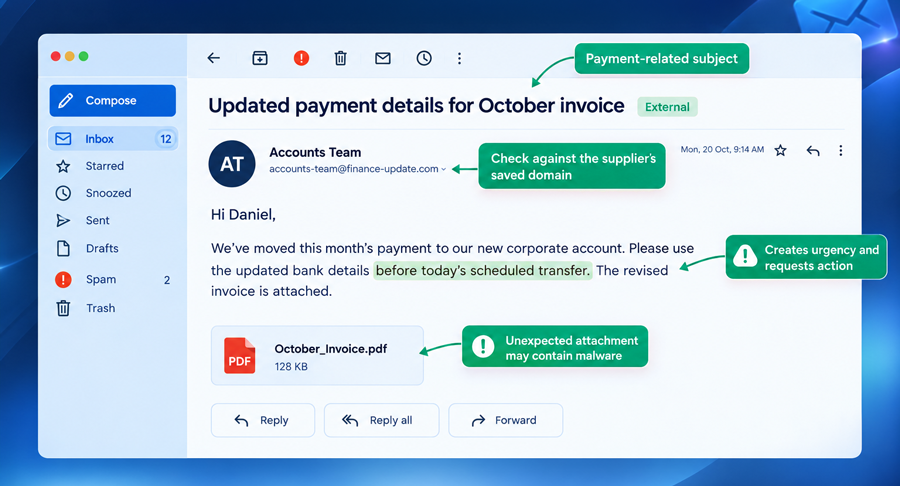
The grammar is flawless. Two things should stop the payment: the bank details changed, and there’s a same-day deadline. Call the supplier on the number in your vendor master file.
Do SPF, DKIM, DMARC and BIMI Stop AI Phishing?
SPF, DKIM, DMARC and BIMI address specific parts of email authentication and sender identification. They cannot determine whether a request is legitimate or whether AI helped create it. Their roles and limits differ:
| Control | What it establishes or supports | What it does not establish |
|---|---|---|
| SPF | The sending server is authorized for the envelope sender domain | That the visible ‘From’ address matches that domain or that the request is legitimate |
| DKIM | A domain’s signature verifies over the signed message content | That the signing domain is the organization the recipient expects or that the content is safe |
| DMARC | A passing SPF or DKIM result aligns with the visible ‘From’ domain; the published policy requests handling of failures | Protection against authenticated lookalikes, compromised accounts or every delivery of spoofed mail |
| BIMI + VMC | Logo display on eligible authenticated mail in supporting inboxes, backed by validation of identity and qualifying logo rights; this also earns a Gmail blue tick. | That the message’s links, attachments or requests are safe |
| BIMI + CMC | Logo display on eligible authenticated mail in supporting inboxes, backed by applicable identity and logo-use validation | Gmail’s blue checkmark or proof that the message’s content is safe |
BIMI (Brand Indicators for Message Identification) supports logo display in participating inboxes when authentication, policy and provider requirements are met. A missing logo does not prove fraud, and a displayed logo does not authorize a payment or access request. Recipients still need to verify sensitive instructions.
How to Protect Against AI Phishing
To protect against AI phishing, combine out-of-band verification with phishing-resistant sign-in and layered technical controls. Confirm any request for money, credentials or access through contact details recorded before the request arrived and trust no request just because of who it appears to come from. Sign-in controls and filters then limit what a message that gets through can do. Prioritize phishing-resistant sign-in and independent verification of payment and access changes.
Use Phishing-Resistant Sign-In
Use FIDO2 security keys or passkeys, starting with finance, executives, administrators and help-desk staff. These methods bind authentication to the legitimate service and resist credential-relay phishing. Authenticator-app codes can improve on SMS in some respects, but manually entered codes remain phishable. Block legacy authentication and review account-recovery methods so attackers cannot bypass the stronger sign-in process.
Verify Requests Out of Band
Require a callback to contact details recorded before the request arrived for bank-detail changes, payroll edits, and MFA resets. Apply the same process when a request arrives by voice or video. A pre-agreed verification phrase can supplement the callback, but it should not replace established approval controls. Give approvers authority to pause a payment while verification is pending.
Restrict App Consent and AI Assistant Access
Require admin approval for unverified apps and alert on every new consent grant. For AI assistants that read mail, limit what they can retrieve with sensitivity labels and least-privilege permissions, apply link protection to links in assistant summaries where supported, and strip or flag hidden text at the gateway where possible.
Inspect Attachments and Check Links at Click Time
Check links at click time as well as on delivery, and scan attachments for QR codes. Route mobile browsing through the same protection as desktop, since people scan QR codes on personal phones.
Enforce DMARC and Watch for Lookalikes
Set up DMARC and move it from p=none to p=reject after reviewing aggregate reports for every legitimate sender. Watch newly registered domains that contain your brand and your top vendors’ brands and add email security with behavioral detection that flags first-time sender domains, unusual payment requests and a sender whose tone has changed.
Train Staff on Realistic Lures
Run simulations with fluent, personalized lures, QR codes and consent prompts. Track how fast people report as well as who clicked.
What to Do if Someone Clicks an AI Phishing Link
Close the suspicious page and report the message promptly. The next steps depend on whether the person entered information, approved access or ran a file. For work accounts and devices, involve IT or the security team so they can contain access and preserve evidence.
- Close the page and report it: If the person only opened the page, close it, report the message and note any downloads or unexpected prompts. IT can assess whether further device checks are needed.
- Revoke sessions and reset the password: If the person entered a password or MFA code, treat the account as potentially compromised. Use the service’s official recovery process to revoke active sessions and change the password. For a work account, ask IT to coordinate these actions. Review recovery details, registered MFA methods and inbox rules. Change any reused password on other accounts.
- Revoke the app’s access: If the person approved an app, ask an administrator to revoke the malicious app’s permissions and investigate its access. A password change alone does not remove the consent grant.
- Report the file and isolate the device: If the person downloaded or opened a file, report the file and describe exactly what happened. If they ran a suspicious executable, enabled active content or see signs of compromise, disconnect the device from the network and follow the security team’s containment instructions.
- Contact the bank: If the person entered card details or sent money, contact the bank’s fraud team immediately to block the card or request a transfer recall. Keep the message and transaction details.
- Report the incident: Notify the organization’s security team for corporate accounts or devices. For personal incidents, use the relevant service’s reporting process and the appropriate local fraud-reporting authority.
Is Your Business Exposed to AI Phishing?
Use these questions to check your authentication, sign-in controls and approval procedures. A “no” or “not sure” identifies an area to investigate. A “yes” to every question does not establish complete protection.
- Does your domain use DMARC enforcement, with reports reviewed to check legitimate sending sources and authentication failures?
- Do finance accounts use phishing-resistant sign-in, with weaker fallback and recovery methods controlled?
- Does your team verify vendor bank-detail changes through contact details already held in its records?
- Are new mailbox-access consent grants reviewed, with alerts or administrative approval where appropriate?
- Does your email protection inspect QR codes in attachments and check supported links when users click them?
AI Phishing and Email Security FAQs
Can AI detectors catch AI-written phishing emails?
Partly. Tools that only analyze the text for “AI-sounding” writing are unreliable. Email security systems that also check sender reputation, authentication results, links, attachments, and behavior catch far more. Detection works best when it doesn’t depend on the wording alone.
What is the difference between phishing, email spoofing, and email impersonation?
Phishing is a social-engineering attack that tricks someone into disclosing information, granting access, sending money, or taking another harmful action. Email spoofing falsifies sender information. Impersonation poses as a trusted person or organization, using techniques such as display-name deception, lookalike domains or compromised accounts. Email spoofing and impersonation can both support phishing.
How can a brand protect its customers from AI phishing that impersonates it?
Combine DMARC enforcement, brand monitoring, fast takedowns and clear customer communication. Tell customers which channels you use, how to verify unusual requests and where to report suspicious messages. A VMC or CMC can support validated logo display on eligible authenticated messages in supporting inboxes, but the logo does not guarantee that a request is safe.
How is AI phishing different from spear phishing?
Spear phishing describes a targeted phishing attack. AI-assisted phishing describes the use of AI in preparing or carrying out an attack. They can overlap: an attacker may use AI to research a recipient and draft a personalized spear-phishing message. AI can also support broader campaigns, so the terms are not interchangeable.
Do small businesses need to worry about AI phishing?
Yes. AI helps attackers send polished, personalized phishing emails to small businesses at scale, often without obvious spelling or grammar mistakes. Small teams may lack dedicated security staff and formal approval processes. Require MFA, enforce DMARC to reduce direct domain spoofing, and verify payment requests or bank-detail changes by calling a known contact number.
Conclusion
Convincing writing and familiar names cannot establish that an email request is legitimate. Verify unexpected payment and access changes through established contact details, use phishing-resistant sign-in and restrict which apps can access mailboxes. Apply these checks even when authentication passes, or the request appears inside an existing conversation.
For customer-facing mail, domain authentication and BIMI provide additional sender-identification signals. Keep customer verification and reporting channels clear so recipients can check requests before acting.
AI-powered phishing can imitate the messages your customers expect from you. Pair DMARC enforcement with BIMI and a VMC or CMC to support validated brand logo display on eligible emails in supported inboxes. Give customers an additional way to identify your authenticated mail as part of your wider protection against impersonation.
Related Posts:


