
 USD
USD  USD
USD  GBP
GBP  EUR
EUR  INR
INR  ZAR
ZAR  AUD
AUD  CAD
CAD  MYR
MYR  SGD
SGD  THB
THB  HKD
HKD  BRL
BRL  AED
AED 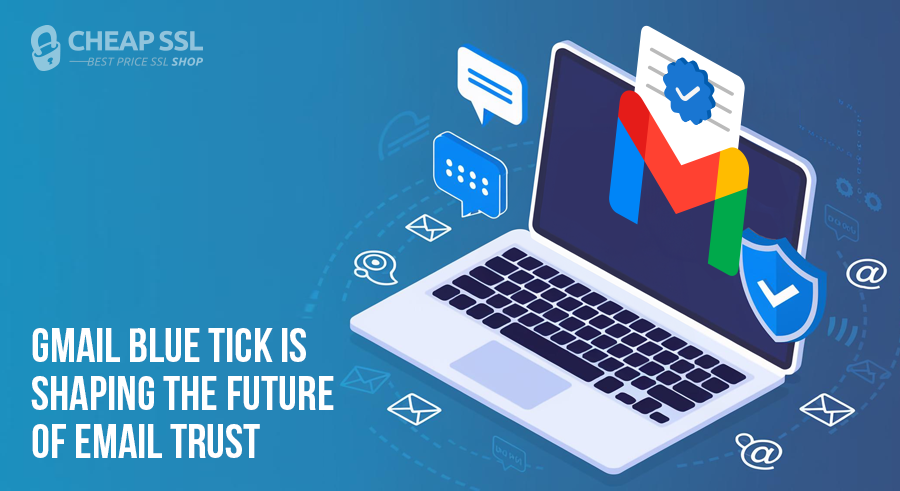
If you’ve ever noticed a blue checkmark next to a sender name in Gmail, you’ve seen Gmail’s verified sender signal in action. It’s subtle and easy to miss, but changes how people read an email.
As inboxes fill with look-alike domains and brand impersonation attempts, users rely more on visual cues to decide what feels legitimate. The blue tick has become one of those cues. It doesn’t promise a better offer or a safer message, but it reduces doubt at the exact moment trust is evaluated.
This article explains what the Gmail verified blue tick actually is, why Google introduced it, what it verifies, and how organizations can realistically qualify for it without chasing myths or shortcuts.
What is the Verified Blue Tick in Gmail?
The Gmail verified blue tick is a visual trust indicator that Google displays in users’ inboxes to signal that an email sender’s identity has been authenticated and verified. It represents a combination of email authentication standards and brand verification that tells recipients the sender truly controls the domain and logo associated with the message.
This verified badge is tied to the Brand Indicators for Message Identification (BIMI) standard, which allows brands to publish a logo that can appear in the inbox once strong security measures and logo verification are in place. Gmail extends this by showing a blue checkmark next to the sender’s verified logo and name to further confirm legitimacy.
Unlike generic profile images which anyone can upload, the verified tick is only shown when a sender has completed the necessary authentication and verified their brand logo with a Verified Mark Certificate (VMC) as part of the BIMI framework.
What users actually see?
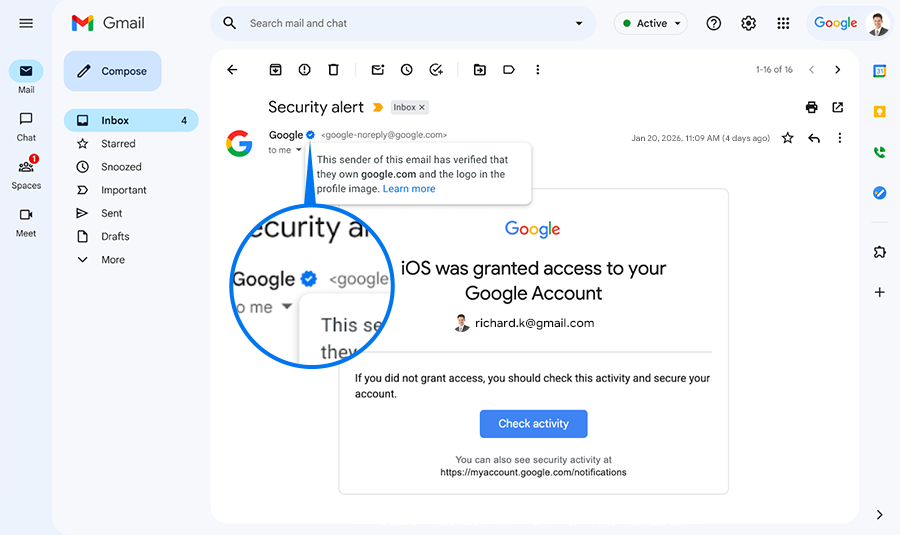
Instead of a generic initial or unverified logo, the sender’s brand logo is displayed with a blue checkmark and a short confirmation that the sender has been verified by Gmail.
Why Gmail Added the Blue Tick (The Trust Problem It Solves)
Email has long faced two intertwined problems:
- technical authentication gaps
- user perception gaps
Traditional email security protocols like SPF, DKIM, and DMARC help mail servers decide whether a message is authentic at a technical level. But they are largely invisible to end users. That means recipients still make trust decisions based on what they see.
To address this, Google expanded Gmail’s support for BIMI and introduced a blue verified checkmark that appears alongside a sender’s brand logo only if the necessary authentication and identity verification steps are successfully completed. The checkmark’s primary purpose is to give users a visible and intuitive signal of legitimacy. It helps quickly distinguish genuine senders from impersonators and phishing attempts.
Unlike spam filters that operate behind the scenes, the blue tick is a user-facing trust signal. It complements technical protections by turning otherwise invisible authentication success into a visible cue that recipients can recognize.
- For brands, it reinforces authenticity and reduces confusion in crowded or high-risk inboxes.
- For users, it boosts confidence in their interactions with email.
In short, Gmail added the blue tick to:
- Make sender identity more visible and trustworthy
- Help users quickly spot real brands versus lookalikes
- Reduce the effectiveness of phishing and impersonation scams
- Encourage broader adoption of strong email authentication standards (SPF/DKIM/DMARC + BIMI)
This is a broader industry trend toward visual trust signals in email, similar to verified badges in social media. It is but grounded in strict authentication and identity validation rather than social popularity or subjective criteria.
What the Blue Tick Actually Verifies
This is where most misinformation exists.
The Gmail blue tick does not mean:
- The sender is popular
- The sender pays Google
- The sender has a high open rate
- The email is “safe” in a general sense
What it does confirm is far more specific. The blue tick verifies:
- The sending domain is authenticated
- The brand identity is validated
- The displayed logo is legitimately owned by the sender
- The domain, authentication, and logo are aligned
The Technology Behind the Blue Email Tick
Behind the visual simplicity is a layered technical foundation designed to tie identity to email delivery.
Email authentication as the baseline
Gmail requires standard authentication mechanisms to be correctly configured:
- SPF to authorize sending servers
- DKIM to cryptographically sign messages
- DMARC to enforce alignment and policy
Without DMARC enforcement (quarantine or reject), visual verification does not occur.
How BIMI connects identity to the inbox
BIMI bridges the gap between authentication and visual identity. It allows a sender to specify which logo should represent the brand; but only after authentication requirements are met.
Where Verified Mark Certificates fit
This is where formal verification enters the process.
A VMC Certificate confirms that:
- The logo belongs to the organization
- The organization is legally validated
- The trademarked logo is authorized for email display
Gmail uses this certificate-based model to avoid arbitrary or spoofed logo claims, making the blue tick resistant to abuse.
How to Get a Verified Blue Tick in Gmail?
Gmail’s blue tick is not something you switch on. It appears only when Google is confident that a sender’s identity can be trusted without qualification. That confidence is built through consistent signals, not a one-time setup.
-
Enforce DMARC at the Domain Level
The starting point is DMARC enforcement. Gmail requires a domain to move beyond monitoring and actively enforce authentication, ensuring that the visible sender aligns with the domain actually sending the message. This establishes accountability at the domain level, where identity decisions are made.
-
Maintain Clean and Consistent Authentication
From there, Gmail looks for authentication stability, not just technical pass results. SPF and DKIM must align with the “From” domain consistently over time. Short-term fixes or fragmented configurations often delay verification because the system is designed to reward predictability.
-
Prepare a Compliant Brand Logo
The next layer is brand identity. The logo shown with the blue tick is treated as an extension of the sender’s identity. Gmail only displays logos that can be cryptographically and legally tied back to the organization sending the email, and in the case of the blue tick, that logo must be trademarked and consistently associated with the authenticated sending domain.
-
Obtain a Verified Mark Certificate
A VMC certificate allows Gmail to confirm that the sender is authorized to use that logo in email and that the organization behind it has been validated. Without this certificate, the blue tick does not appear.
-
Publish the BIMI Record
Finally, the BIMI record makes this verified identity visible. It does not create trust but publishes trust that Gmail has already validated.
-
Allow Time for Visibility
There is no instant activation. Gmail observes behavior over time, and visibility may roll out gradually. The blue tick is not a reward for configuration speed; it is a signal of durable sender identity.
Final Thoughts
The Gmail blue tick works precisely because it doesn’t ask users to think. It sits quietly in the inbox and lets people move on with a little less doubt about who’s on the other side of the email. That’s the real shift. Email identity is no longer something only mail servers evaluate in the background. It’s becoming part of how people scan, pause and decide. For senders, the blue tick is a trust signal that their email identity holds up when it’s finally put in front of users.
Verified Mark Certificate for Gmail Blue Tick
Prove brand ownership and show a verified sender identity directly in the Gmail inbox. A Verified Mark Certificate enables Gmail’s blue checkmark by confirming that your domain, authentication, and trademarked logo are aligned. Built for organizations that want their email identity to be clear, consistent, and verifiable.
Related Posts: