

 USD
USD  USD
USD  GBP
GBP  EUR
EUR  INR
INR  ZAR
ZAR  AUD
AUD  CAD
CAD  MYR
MYR  SGD
SGD  THB
THB  HKD
HKD  BRL
BRL  AED
AED 
Software supply chain attacks keep climbing and attackers are getting better at slipping malicious code into trusted software. Code signing certificates are meant to stop exactly that, they help developers prove the origin of their applications and assure users that the code hasn’t been altered along the way.
But owning a certificate is only half the story. Many teams unintentionally weaken their security by mismanaging private keys, reusing passwords, storing certificates in unsafe locations, or treating code signing as a “set-and-forget” task. These mistakes open the door to injection attacks, unauthorized builds, and tampered releases, the very threats code signing is designed to prevent.
In this article, we’ll break down the most common mistakes developers make with code signing certificates and why they matter. More importantly, you’ll learn practical ways to avoid them so you can ship trusted software and maintain the integrity of your build pipeline.
What Code Signing Certificates Do?
Code signing certificates assure that the software, scripts, containers, or executables are of a reputable origin. It helps users identify whether the publisher of the software, app, or code is authentic. This is done through a pair of security keys. One is stored by the publisher securely, while the other is sent to the user, distributed through a public certificate. Depending on your needs, this certificate can be issued as an Organization Validation or Extended Validation code signing certificate, both verify publisher identity, with EV offering stricter validation and hardware-based key protection.
A code signing certificate is a part of the broader chain of trust. In this chain, the certificate authority validates the publisher’s identity to provide the certificate. It becomes your apps or software’s identity across operating systems, browsers, and platforms.
In the current era of complex software development processes, it is important to ensure security. Especially code security across CI/CD pipelines can be complex. Data security is guaranteed with the help of a code signing certificate. However, if you are a web-admin, a DevOps engineer, or an IT security manager, you must ensure that you do not see foolhardy development teams.
What are these mistakes, and what is the impact? Let’s discover.
Top Mistakes Developers Make While Implementing a Code Signing Certificate
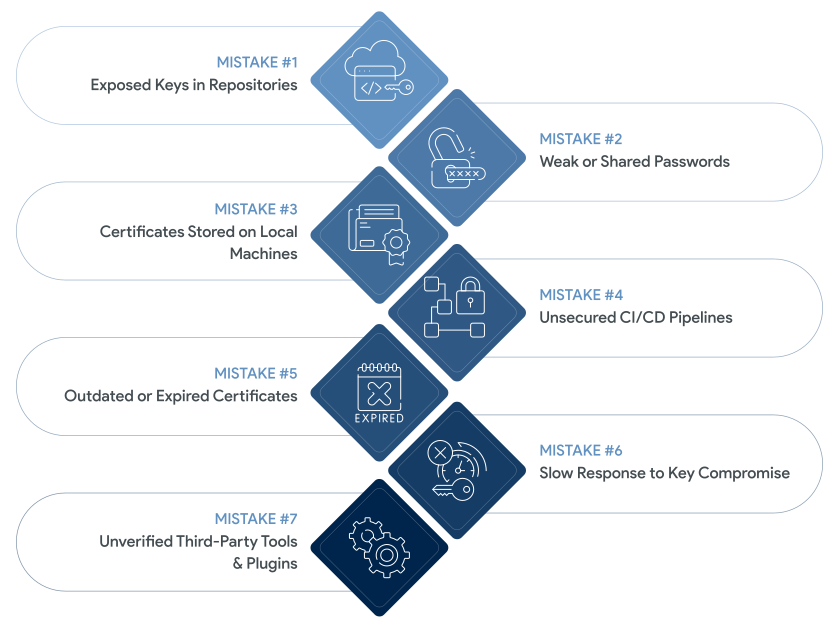
Development teams often make mistakes while handling code signing certificates. This can be due to pressure of rapid releases, lack of coordination, and often a lack of ownership. Reasons can be many, but what’s important is to avoid such pitfalls. Let’s understand them.
Mistake #1: Storing Private Keys in Source Repositories
First and most common mistake is to commit certificate files (.pfx, .p12) to Git. It opens up access to contractors, former employees, or cyber attackers. This can cause misuse of repositories, adding malicious code.
Some of the secure alternatives that you can use are,
- Hardware that follows security protocols like Hardware Security Modules (HSMs) and YubiKeys
- Cloud-based security key management platforms
Mistake #2: Using Weak or Shared Passwords
The use of passwords which are hard to crack is one of the practices that your team may consider. This might appear to be a mere solution, but it works. In case the device or Slack account belonging to a member of the team, is compromised, then it may become a security breach.
Best practices to use are,
- Provide role-based access credentials
- Ensure data governance protocols
- Change the passwords regularly
Mistake #3: Keeping Certificates on Developer Machines
Local storage of the code signing certificates can lead to risks of exposure. It can be exposed to malware, disk theft, accidental uploads, and debugging tool leaks.
Best practices to avoid such a scenario are,
- To store security keys in a controlled environment
- Apply least-privilege access.
Mistake #4: Failing to Protect Build Pipelines
Most build pipelines get exposed to cyberattacks due to unsecured CI environments. The modern software development process is complex and often involves merging code from multiple sources. Some coders are onsite while others operate from remote locations. Ensuring security in such scenarios becomes difficult.
Use these practices,
- Employ zero-trust pipeline architecture
- Use cloud-hosted environments
- Leverage automated configuration audits
Mistake #5: Using Expired Certificates
With the new protocol for reducing the expiration period for security certificates, tracking renewals becomes crucial. It will result in code signing certificates expiring after 460 days. If not renewed within time, it can lead to operational disruptions.
The best way to avoid such a scenario is to,
- Automate tracking of expired certificates and renewals
- Maintain a centralized inventory of all active certificates
- Review signing algorithms and replace weak or outdated certificates
Mistake #6: Not Revoking Compromised Certificates
If your private key is compromised, your certificate can be revoked immediately, and if not, it can be followed by a data breach. It is an expensive error, and to prevent it, a checklist should be used.
- Checking on the certificate compromise
- Revoking the certificate with the CA
- Generate new keys and get certificates reissued
- Re-sign your deliverables
Mistake #7 Blindly Trusting Third-Party Build Tools
Apps tend to contain unsigned plugins, third-party integrations, and SDKs that are out of date. This would be an entry point where the cyber attackers could inject malicious code into your app. In order to prevent the same, you may take the following steps,
- Only integrate signed and verified third-party apps
- Audit your plugins and their repositories
- Review changelogs and identify anomalies
Secure vs Insecure Code-Signing Practices
| Aspect | Insecure Approach | Secure Recommended Approach |
|---|---|---|
| Key Storage | Keys stored locally or in Git repos | Hardware-backed storage (HSM, Vault, YubiKey) |
| Passwords | Shared or weak passphrases | Strong individual credentials + rotation |
| Signing Location | Developer machines | Locked-down CI/CD build environments |
| Build Pipeline | Plain-text secrets & outdated runners | Zero-trust pipelines + ephemeral runners |
| Certificate Lifecycle | Manual renewal, forgotten expirations | Automated tracking & renewal |
| After Compromise | Delayed revocation | Immediate revoke + reissue + notify |
| Tooling | Unverified plugins/tools | Signed, validated, and monitored dependencies |
| Visibility & Logs | Limited audit trails | Full signing logs, SBOMs, provenance |
How to Implement a Secure Code-Signing Strategy
To add protective code-signing and control the security key pairs, there needs to be strategic policies and verifiable release pipes. This, however, does not imply that you are supposed to make your app development process slow. This is aimed at obtaining a security scale while still having speed.
-
Use managed certificate services or cloud-based signing
Always try to get a code signing certificate from a trusted platform. This ensures security while you distribute it across teams and sign deliverables. Using managed certificate services can help you minimize risks, optimize security, and ensure lifecycle management.
-
Enforce hardware-backed key protection
Storing private keys inside HSMs and KMS solutions can help you avoid compromise of the keys. You can also use hardware tokens. It helps in reducing the chances of cloning or unauthorized access.
-
Apply role-based access control (RBAC)
Establish a limit on who can access security keys, sign, approve, or request certificates. Use role-based access policies and separate the credentials between developers and release engineers.
-
Use trusted timestamping for long-term signature validity
Use timestamping during the signing process. It makes sure that your signatures remain valid even after the certificate expires and prevents attackers from re signing modified binaries with backdated timestamps.
-
Enable signing logs, artifact provenance, and traceability (SLSA, Sigstore, SBOMs)
Notarize your scripts, build attestation frameworks, and use standards like SLSA, Sigstore, or SBOMs. Log every code signing event.
-
Automate certificate renewal, rotation, and revocation
Reduce the manual dependency to manage code signing certificates. Leverage managed services to ensure lifecycle management, including renewal tracking, key rotation, and revocations.
Conclusion
Secure code signing depends on more than holding a certificate, it requires disciplined key management, controlled access, and hardened pipelines. When teams avoid the common mistakes outlined above and rely on well-structured, automated signing practices, every release stays trusted and tamper-proof.
Stop Software Tampering Before It Starts
Most breaches start with small mistakes, exposed keys, loose CI pipelines, or expired certificates that no one tracked. Tightening your code-signing workflow protects your releases and keeps tampered builds out of the hands of your users.
Related Posts:
- Why Code Signing Certificates Are Essential for Software Developers and Vendors
- How Compromised Code Signing Keys Lead to Real-World Malware Incidents
- What is HSM? An Introduction to Hardware Security Module
- What is a YubiKey in Code Signing Certificate?
- HSM vs TPM: Security Comparison, Use Cases, and Deployment
- Why AI-Generated Code Still Needs Human-Verified Code Signing Certificates