

 USD
USD  USD
USD  GBP
GBP  EUR
EUR  INR
INR  ZAR
ZAR  AUD
AUD  CAD
CAD  MYR
MYR  SGD
SGD  THB
THB  HKD
HKD  BRL
BRL  AED
AED 
It’s the mechanism underneath HTTPS websites, online banking, messaging apps, cloud storage, and enterprise databases – anywhere information needs to stay private while it moves across or sits on systems you don’t fully control.
Encryption isn’t secrecy about how it works. The algorithms themselves (AES, RSA, and the rest) are public, published, and picked apart by cryptographers for decades. The security comes entirely from the key – specifically, from how large the space of possible keys is. A 256-bit key has more possible combinations than there are atoms in the observable universe; guessing it is meaningless. That single fact is why encryption works even though everyone can see exactly how it’s built.
Table of Contents
How Data Encryption Works?
Every encryption operation follows the same basic path:
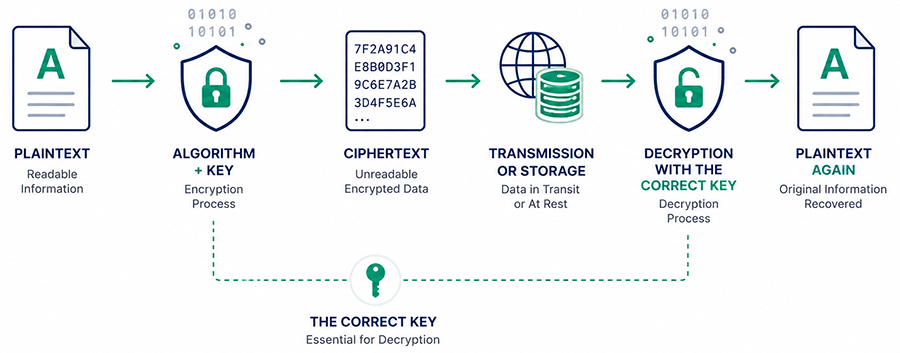
Take a simple example: the message “Meet at 10 AM.” Run through AES, it doesn’t just swap letters like a childhood cipher. The algorithm breaks the message into fixed-size blocks and runs each one through multiple rounds of substitution and mixing, folding in part of the key at every round.
Each round depends on the last, so flipping even one bit of the original message produces a completely different, unrelated-looking result – something like “7F2A91C4E8B0…” This is called the avalanche effect, and it’s what makes brute-forcing pointless: there’s no partial credit for a partial guess, so an attacker can’t narrow the search by getting close.
The output carries no statistical trace of the original message. That matters more than it sounds like it should – early ciphers failed specifically because patterns leaked through (letter frequency, repeated words, predictable structure). Modern ciphertext is designed to be indistinguishable from random noise.
One common misconception worth clearing up early: longer keys aren’t automatically “more secure” in any meaningful sense once you’re past a certain point. Once you’re at AES-256, you’re paying for margin against a threat that doesn’t exist yet with classical computers, not closing a gap that’s actually there today. The actual weak point in nearly every real-world encryption failure is what happens to the key after it’s generated: where it’s stored, who can reach it, whether it’s rotated. We’ll come back to that.
Symmetric vs. Asymmetric Encryption
There are two fundamental approaches, and real systems almost never choose one over the other – they use both, for different jobs, in the same connection.
Symmetric encryption
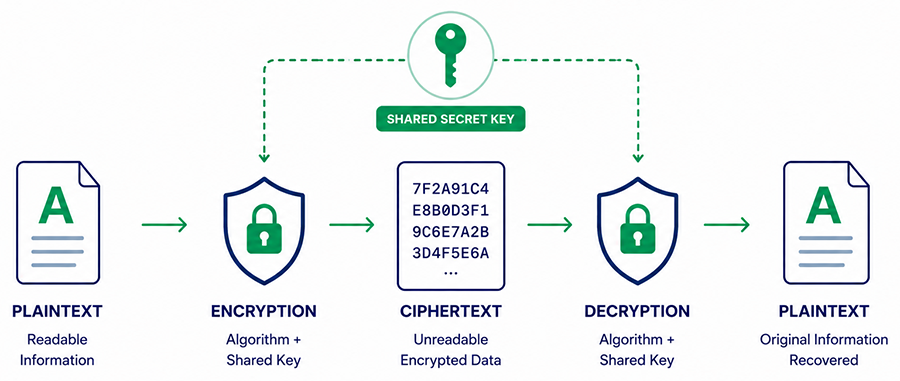
It uses a single shared key for both encrypting and decrypting. It’s fast enough to encrypt an entire disk or database in real time, which is why it protects data at rest. What it doesn’t solve is distribution: if two parties need to share a key, they need a way to exchange it securely first. That’s the real reason symmetric encryption alone was never enough for the open internet — a browser and a server that has never met have no pre-shared secret and no channel to create one over that isn’t already being watched.
Asymmetric encryption
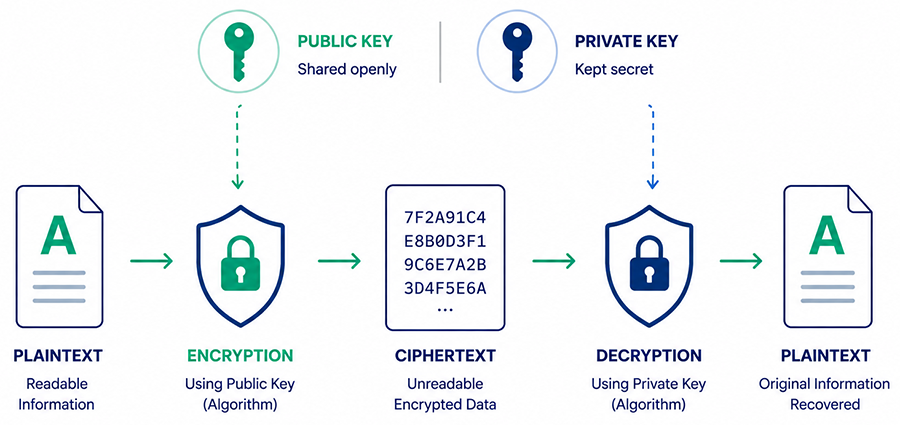
This encryption method exists specifically to solve that problem. Instead of one key, you generate a mathematically linked pair: a public key you hand out freely, and a private key you never share. Anything encrypted with the public key can only be decrypted with the matching private key, so the public key can travel over an insecure channel without compromising anything. The tradeoff is cost – The underlying mathematics is far more computationally expensive than modern symmetric encryption, which is why encrypting a large file directly with RSA would be impractically slow.
Neither approach replaces the other. Modern systems combine them because each solves a different problem.
| Symmetric | Asymmetric | |
|---|---|---|
| Keys used | One shared key | Public + private key pair |
| Speed | Fast | Slower |
| Solves | Bulk data protection | Key distribution over an insecure channel |
| Used for | Disks, databases, backups | TLS handshakes, digital signatures, authentication |
| Examples | AES, ChaCha20 | RSA, ECC, ML-KEM |
How HTTPS actually uses both:
When a browser connects to an HTTPS website, the extra step that separates HTTPS from HTTP is the TLS handshake uses asymmetric cryptography to verify the server’s identity and securely establish a shared session key. Once that key is exchanged, symmetric encryption protects the rest of the session-including page content, login credentials, form submissions, and payment details – because it’s much faster for continuous communication.
In simple terms, asymmetric encryption starts the secure connection, while symmetric encryption keeps it fast and efficient. This combination is what allows SSL/TLS certificates to provide both authentication and encrypted communication.
Encryption vs. Hashing vs. Encoding vs. Tokenization
These four get confused constantly, and the mix-up isn’t harmless – it shows up in real breach postmortems.
| Reversible? | Purpose | Example use | |
|---|---|---|---|
| Encryption | Yes, with the correct key | Keep data confidential but recoverable | Encrypting a database column |
| Hashing | No – one-way | Verify data without storing the original | Storing passwords |
| Encoding | Yes, no key needed | Reformat data for compatibility, not security | Base64-encoding an image for a URL |
| Tokenization | Only via a separate lookup system | Replace sensitive data with a non-sensitive placeholder | Storing a token instead of a card number |
The mistake worth naming specifically: systems that encrypt passwords instead of hashing them. Encrypted passwords can be decrypted – meaning anyone holding the key, including a compromised admin account, can read every user’s actual password in plaintext. Hashing avoids this entirely, since the system only ever needs to check that a submitted password matches the stored hash, never to recover the original. This is a design flaw, not an edge case, and it recurs across breach disclosures more often than it should.
Encoding is the one most often mistaken for security. Base64 or URL encoding makes data safe to transmit, not safe to read – anyone can decode it instantly, with no key involved. It solves a compatibility problem.
The Three States of Data
A complete encryption strategy protects data in all three states it can exist in – and organizations reliably get one of them wrong.
| State | Typical protection | Where it usually breaks down |
|---|---|---|
| In transit | TLS/HTTPS, VPNs | Rarely – this is the state most organizations get right by now |
| At rest | Disk, database, or file-level encryption | Backups and exports left unencrypted because they’re “just temporary” |
| In use | Confidential computing (emerging) | Data must be decrypted into memory to be processed – a real, exploitable window if the machine itself is compromised |
Data in use is a genuinely hard problem. To process data, a system generally has to decrypt it into memory first, and if an attacker has compromised the machine itself, encryption at rest and in transit are both irrelevant – the data is sitting in plaintext in RAM while it’s being worked on. Confidential computing (hardware-isolated enclaves where even the operating system can’t see the data inside) is the emerging answer, but it’s still new, not yet standard practice.
Where Encryption Actually Fails in Practice
Ask most people how encryption gets broken and they’ll describe a brute-force attack. Modern encryption, when correctly implemented, isn’t being brute-forced by anyone – the failures that make headlines are almost always about what happens around the algorithm:
- A key left in a config file pushed to a public repository
- A backup encrypted with a weaker legacy setting nobody updated
- A password encrypted instead of hashed
- Access to keys not restricted or logged
- Keys never rotated, so a single leak has an indefinite blast radius
None of these are failures of mathematics. They’re failures of process.
Ransomware deserves a specific callout, because it’s the case people most consistently misunderstand: encrypting your own data protects it from being read if it’s stolen. It does nothing to stop it from being locked – ransomware is encryption too, just run by an attacker holding the only key. Strong production encryption and ransomware resilience are almost separate problems. What actually helps is offline backups an attacker can’t reach to re-encrypt, and detection fast enough to catch an attack before it spreads.
Common Encryption Algorithms in 2026
| Algorithm | Type | Status |
|---|---|---|
| AES-256-GCM | Symmetric | Current standard – default choice |
| ChaCha20-Poly1305 | Symmetric | Preferred on devices without AES hardware acceleration |
| RSA (2048-bit+) | Asymmetric | Still widely deployed, well understood |
| ECC | Asymmetric | Increasingly the default for new deployments |
| 3DES | Symmetric | Deprecated – avoid for new systems |
| RC4, single DES | Symmetric | Broken – do not use |
| ML-KEM, ML-DSA, SLH-DSA | Post-quantum | Emerging – see below |
AES encryption won its position for a reason worth knowing. In the late 1990s, NIST ran an open public competition to replace the aging DES standard – fifteen candidates, attacked and analyzed publicly for years before a winner was chosen. That process is why AES is trusted today; it survived adversarial scrutiny by people actively trying to break it.
RSA and ECC represent the real tradeoff in asymmetric cryptography. RSA’s security rests on how hard it is to factor very large numbers back into their prime components. ECC encryption gets equivalent security from a different mathematical structure – points on an elliptic curve – with dramatically shorter keys: a 256-bit ECC key is roughly as hard to break as a 3072-bit RSA key.
That’s why ECC has become the default for anything mobile or bandwidth-constrained – shorter keys mean less data to transmit and less computation to perform, which matters on a phone or IoT device far more than on a server. It’s increasingly the default for new certificates generally, for the same reason.
RC4 and single DES are cryptographically broken. RC4 has known statistical biases that let attackers recover plaintext without touching the key; DES’s 56-bit key falls to brute force in hours on rented hardware. If either shows up in a system you’re responsible for, that’s not a modernization backlog item – it’s a today problem.
Common Myths About Encryption
- Encryption makes you anonymous. No – it protects the content of your data, not your identity or metadata. Who you communicated with, when, and how much data was sent can still be visible.
- HTTPS means my data is fully encrypted. No – HTTPS encrypts data in transit between browser and server only. Data sitting in a database, backup, or exported file needs separate protection.
- A longer key is always meaningfully more secure. Not once you’re past a reasonable threshold. AES-256 isn’t closing a realistic attack gap over AES-128 for most use cases – it’s adding margin against a threat that doesn’t yet exist.
- Encryption stops ransomware. It doesn’t. Encrypting your own data protects it from being read if stolen; it does nothing to prevent an attacker from encrypting it again with their own key and locking you out.
- Passwords should be encrypted. They shouldn’t – they should be hashed. Encrypted passwords can be decrypted by anyone holding the key.
Why Data Encryption Matters
- Confidentiality – protects customer records, financial data, intellectual property, and internal communications from unauthorized access.
- Integrity – modern authenticated encryption (like AES-GCM) can detect if data was altered.
- Authentication – digital signatures verify sender identity and prevent denial after the fact.
- Compliance – helps organizations meet regulatory requirements such as GDPR, HIPAA, PCI DSS, and industry-specific security standards.
- Breach impact reduction – properly encrypted stolen data is far less useful to attackers, and some regulations reduce disclosure obligations accordingly.
This plays out across regulated industries in slightly different ways: healthcare relies on it to meet HIPAA requirements around patient records, financial services to satisfy PCI DSS on payment data, and government and legal sectors to protect classified or privileged information where a breach carries legal, not just financial, consequences.
Data Encryption Trends to Watch in 2026
Post-quantum cryptography is the one genuine structural shift underway. A sufficiently powerful quantum computer would solve the exact mathematical problems RSA and ECC rely on being hard – not slowly, but in a way that makes “hard” stop applying. That computer doesn’t exist yet, but an attacker doesn’t need one today to benefit from one eventually: they can intercept and store encrypted data now and simply wait. This is called harvest now, decrypt later, and it’s a rational attack against anything that needs to stay confidential for a decade or more.
NIST finalized the first quantum-resistant standards in August 2024, after eight years of open evaluation:
| Standard | Purpose |
|---|---|
| ML-KEM (FIPS 203) | Key exchange – replaces RSA/ECDH |
| ML-DSA (FIPS 204) | Digital signatures – replaces RSA/ECDSA |
| SLH-DSA (FIPS 205) | Hash-based signatures – conservative fallback |
The NSA has set 2030 as a migration deadline for national security systems – a real forcing function for organizations that fall under it. For most businesses, the practical move right now isn’t migrating production systems preemptively — early post-quantum implementations are still maturing, with larger key sizes, unresolved interoperability issues, and less real-world hardening than RSA or ECC have had for decades. What’s worth doing now is knowing where RSA and ECC are used across your infrastructure, so migration becomes a planned project instead of a scramble later.
Two other trends worth tracking: confidential computing, which is starting to close the “data in use” gap described above, and Encryption as a Service (EaaS), where cloud providers handle key management and encryption infrastructure directly rather than organizations building it themselves.
Data Encryption Best Practices
- Use current algorithms. AES-256 for symmetric encryption, ECC or RSA-2048+ for asymmetric. Avoid deploying DES, RC4, or other deprecated algorithms in anything new.
- Protect your keys, not just your data. Store keys separately from encrypted data, restrict access to authorized systems, rotate keys on a schedule, and revoke compromised keys immediately.
- Encrypt backups and exports to the same standard as production – not a legacy fallback because it’s “just temporary.”
- Use validated cryptographic software that supports current standards like FIPS 140-3 and TLS 1.3.
- Maintain a cryptographic inventory – what algorithms, key sizes, and certificate types are in use where. This becomes essential when planning a future post-quantum migration.
- Pair encryption with monitoring and access controls. Strong encryption doesn’t help if a compromised endpoint hands over the plaintext before it’s ever encrypted.
Frequently Asked Questions
What is data encryption in simple terms?
Data encryption is the process of converting readable data into an unreadable format, so only someone with the correct key can read it.
How is data actually encrypted?
An algorithm combines the original data with a secret key through a series of mathematical transformations, producing ciphertext that reveals nothing about the original content without that same key to reverse the process.
What’s the difference between symmetric and asymmetric encryption?
Symmetric uses one shared key for both encrypting and decrypting; asymmetric uses a public/private key pair. Most systems, including HTTPS, use both together.
Does HTTPS mean my data is fully encrypted?
No. HTTPS encrypts data moving between your browser and the server. Data stored in databases, files, or backups needs separate encryption.
Can encrypted data be hacked?
Modern encryption like AES-256 isn’t realistically breakable through brute force with today’s computers. Real-world compromises almost always come from weak passwords, stolen keys, misconfigured systems, or social engineering.
Can encryption stop ransomware?
Not by itself. Encryption protects data from being read if stolen; ransomware works by encrypting your data with an attacker’s key so you can’t access it. Resilience depends on offline backups and fast detection, not encryption alone.
What is the safest encryption algorithm today?
AES-256-GCM for symmetric use cases; ECC is increasingly preferred for new asymmetric deployments.
Why does post-quantum cryptography matter if quantum computers don’t exist yet?
Because of harvest-now-decrypt-later: data intercepted and stored today can be decrypted once quantum computing catches up, which matters for anything that needs to stay confidential for years.
Is 3DES still safe to use?
3DES encryption standard isn’t broken the way RC4 or single DES are, but it’s deprecated – it shouldn’t be chosen for anything new.
Conclusion
Data encryption remains one of the most important security technologies in modern computing, whether data is stored, moving between systems, or being processed in memory. The fundamentals haven’t changed: use validated algorithms, protect and rotate keys, encrypt across all three states of data, and use TLS/HTTPS everywhere it applies. What’s shifted is the context it sits in – post-quantum migration is no longer a distant academic concern, and the practical failures that matter most are rarely about the math, they’re about key management and process.
The strongest encryption strategy isn’t simply choosing a modern algorithm. It’s combining proven cryptography with disciplined key management, secure implementation, and continuous review as threats evolve.
Your strongest encryption algorithms mean nothing without a properly issued SSL/TLS certificate to activate the secure handshake this guide explains. Get a CA-signed SSL certificate from CheapSSLShop and put that encryption to work on your own site.
Related Posts: