

 USD
USD  USD
USD  GBP
GBP  EUR
EUR  INR
INR  ZAR
ZAR  AUD
AUD  CAD
CAD  MYR
MYR  SGD
SGD  THB
THB  HKD
HKD  BRL
BRL  AED
AED 
For years, people learned to associate HTTPS with a “secure site.” When a browser connects using SSL/TLS, the traffic between the user and the server is encrypted, which prevents outsiders from reading or modifying the data in transit.
SSL stripping attacks exploit a weak moment in that process. An attacker positioned on the network intercepts the initial request and prevents the browser from switching to HTTPS. The victim continues over plain HTTP, while the attacker keeps a secure session with the real server in the background.
What looks like a normal browsing session is actually exposed traffic.
This article walks through what SSL stripping is, how the attack works, the risks it creates, and the practical defenses that stop it.
What is an SSL Stripping Attack?
An SSL stripping attack is a downgrade technique that forces a web session to stay on HTTP instead of upgrading to secure network. Because it forces a downgrade from HTTPS to HTTP, the technique is often called an SSL downgrade attack. In this man-in-the-middle attack, the perpetrator intercepts network traffic and either deletes or strips out the encryption layer between the browser and the web server.
SSL certificates encrypt the traffic and authenticate the server using digital certificates, so the browser knows it is talking to the legitimate site. Modern websites actually use TLS, not SSL. The older name stayed in common use, so the attack is still called SSL stripping.
What attackers do seek is uncomplicated. They would like to force users onto an unencrypted connection without their knowledge. The victim believes they are surfing safely. They’re not. In the meantime, plaintext passwords and sensitive information pass straight over the heads of cybercriminals.
How SSL Stripping Attacks Work?
Below is a step-by-step breakdown of the actual working mechanism of an attack by stripping an SSL event:
- Request for site: The situation arises when a browser sends a request, and the server does not redirect it to HTTPS.
- Man-in-the-Middle: The attacker places it between the site and the user, thereby gaining a foothold in the local network.
- Splitting the connection: The connection is separated into two sessions. As the attacker is holding an encrypted HTTPS connection with the legitimate server, another raw, unsecured connection is running concurrently.
- Deactivation of HTTPS redirection: The web server tries to send the user a redirect to HTTPS. The redirect is, however, rewritten or killed before being received by the client.
- Data exposure: Because the victim stays on HTTP, all traffic between the browser and attacker is readable and can be modified before it reaches the real server.
How Attackers Gain the Position Needed for SSL Stripping?
To successfully execute an SSL stripping attack, a hacker has to place themselves right between your device and the server you are trying to reach. They need to grab your data during the exchange so they can force that secure connection back down to plain, unencrypted text. Usually, they get into this middle position through three specific paths.
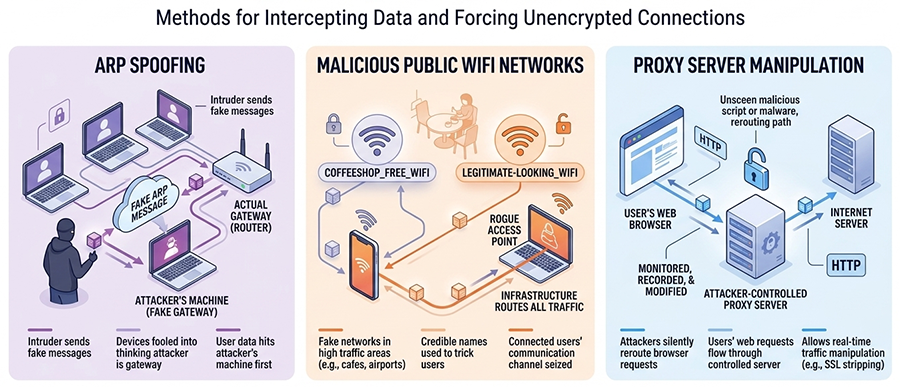
ARP spoofing
The intruder sends fake messages across a local network to scramble how devices talk to each other. They basically trick the system into thinking their hardware is the gateway, so your data hits their machine before it ever reaches its intended destination.
Malicious Public WiFi Networks
Hackers place fake WiFi networks in places with high traffic areas, like cafes or airports, and name them after seemingly credible names. When connected, the attackers seize the channel of communication. As such, their infrastructure routes all information being sent or received.
Proxy Server Manipulation
Attackers monitor, record, or even modify your web requests in real time by silently rerouting your browser to a server that they control.
Risks and Security Fallout of SSL Stripping
Without that protective shield, anyone capturing your traffic can see all data in plain text. Data like passwords, banking details, private account numbers, all of it sitting in the open, readable by anyone patient enough to watch the wire.
Credential Theft: Getting login info becomes easy with SSL stripping. As users type their credentials, attackers quietly pull them straight out of the data stream before they ever reach the server.
Tampering with Info: Once the connection falls back to HTTP, the attacker can intercept and modify responses from the server. Someone sitting between you and the site can intercept requests and responses, modify content, and deliver altered pages to the browser. The browser renders whatever content the attacker forwards after altering it.
Phishing and Malicious Injections: Since they control the data flow, injecting fake forms or malicious redirects directly onto a legitimate page is surprisingly straightforward. The page looks real, URL looks familiar, but somewhere in the middle, the content was modified in transit, and that “submit” button now points somewhere it shouldn’t.
Business Impact: A brand that spent years building credibility can find itself associated with a single security failure for years afterward. The worst part is that most users never notice anything wrong while it’s actually happening.
How to Prevent SSL Stripping Attacks?
Stopping SSL stripping is all about ensuring data never leaves the safety of encryption. Here are some ways to prevent it.
Implement HTTP Strict Transport Security (HSTS)
Start with HSTS; it stands for HTTP Strict Transport Security. This instructs browsers to always use HTTPS for the domain after the first secure visit. It basically kills the attack before it can even take a breath by making secure connections the only option.
Use HTTPS Across the Entire Website
To beat these sneaky downgrade tactics, you have to close every possible loophole that could let an insecure connection. If your images or scripts load over an unprotected connection, you are vulnerable. Every corner of your digital property (from the main site to the smallest subdomain) needs a secure connection. If a single asset loads via HTTP, a hacker can use that tiny opening to hijack the whole session.
Enable Secure Cookies
Web developers must use the secure flag. It’s a simple setting, but it matters. It tells the browser to only send cookies over HTTPS, so if an attacker tries to force a downgrade, the browser refuses to hand over session data entirely.
Use VPN on Untrusted Networks
Enable VPN on public WiFi; It builds a private, encrypted tunnel around your data, keeping local hackers out even when the network around you is already compromised. Frankly, it’s one of the easier protections to put in place.
Keep SSL/TLS Configurations Updated
Use modern TLS versions and trusted certificate authorities. Eliminate outdated ciphers, which only give an illusion of security. Audits periodically ensure that your server is not the weakest link that anyone can discover.
Educate Users About Secure Connections
Inform your users about what a secure URL actually looks like. If the browser flags a site unsafe, or HTTPS is missing altogether, they should stop and close the tab. A layered defense is the only real answer. Mix the right technical barriers with a bit of human awareness, and you end up with something genuinely hard to crack.
Conclusion
SSL stripping survives because of small gaps in how HTTPS is enforced. A single unsecured request, a missing redirect, or a misconfigured header is often enough for an attacker sitting in the network path to keep the session in plain HTTP. That’s why partial protection does not hold up in practice. Enforce HTTPS everywhere, deploy HSTS, secure session cookies, and avoid trusting unknown networks. Once browsers are forced onto encrypted connections from the start, the downgrade window closes and the attacker loses the leverage that makes SSL stripping possible.
Don’t Let Attackers Downgrade Your Website Security
SSL stripping attacks exploit unsecured connections to keep users on HTTP, exposing data that should be protected by encryption. Enforce HTTPS from the start with a trusted SSL/TLS certificate and prevent attackers from intercepting sensitive traffic.
Related Articles: