
 USD
USD  USD
USD  GBP
GBP  EUR
EUR  INR
INR  ZAR
ZAR  AUD
AUD  CAD
CAD  MYR
MYR  SGD
SGD  THB
THB  HKD
HKD  BRL
BRL  AED
AED 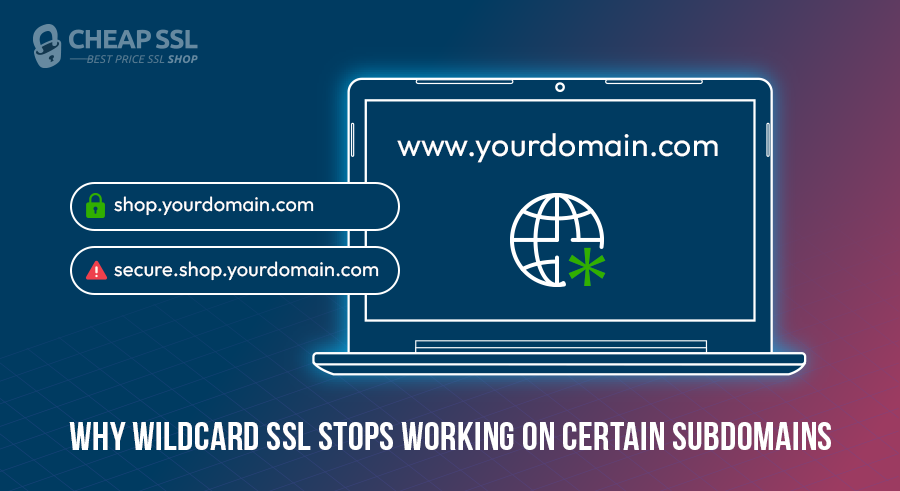
You install a wildcard SSL certificate, everything looks right and then one subdomain throws a domain mismatch error. The browser flags it as untrusted, users see a warning and your certificate, which you paid for and configured correctly, appears to be broken.
The problem is usually a single misconception that a wildcard certificate secures all subdomains under your domain. But it covers exactly one level of subdomain depth, and anything deeper falls outside its scope entirely.
This guide explains why that boundary exists, how to identify which subdomains are affected, and which certificate type actually solves the problem for your setup.
What a Wildcard SSL Certificate Actually Covers
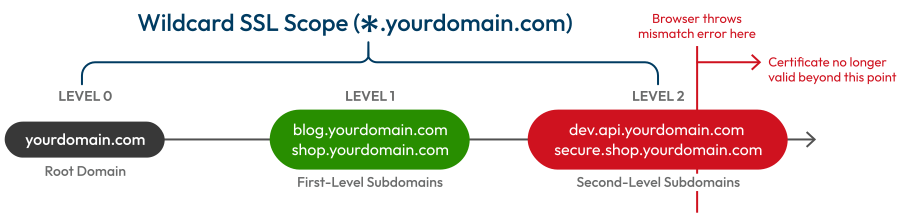
A wildcard certificate like *.yourdomain.com uses an asterisk as a placeholder for a single label, the part directly to the left of your root domain. That means:
- blog.yourdomain.com → covered
- shop.yourdomain.com → covered
- mail.yourdomain.com → covered
- dev.api.yourdomain.com → not covered
- secure.shop.yourdomain.com → not covered
- auth.portal.yourdomain.com → not covered
Most commercial wildcards secure the base domain as a Subject Alternative Name, or SAN, so yourdomain.com itself is usually protected too. But go one level deeper, and the whole thing breaks.
If you use SSL certificate for subdomains, wildcard certificates are genuinely cheaper than buying individual certificates for every first-level subdomain you run. You manage one certificate, not multiple. New subdomains spin up, and they’re covered automatically, no paperwork, no extra cost.
Why Your Wildcard SSL isn’t Working on Some Subdomains
When a browser connects to a hostname, it checks whether that hostname matches what’s listed in the certificate’s Common Name (CN) or Subject Alternative Names (SANs). If there’s no match, it throws a domain mismatch error, even if the certificate is valid, properly installed, and not expired.
The issue is scope, not installation. *.yourdomain.com matches blog.yourdomain.com because “blog” is a single label in the leftmost position. It does not match dev.api.yourdomain.com because “dev.api” is two labels and the wildcard can only substitute for one.
If the SAN section shows *.yourdomain.com but your hostname has more depth, that’s your mismatch. Here, your hostname is simply outside its coverage pattern.
This becomes a real problem in DevOps and enterprise environments where subdomain naming schemes get complex with staging environments, API versioning, and multi-tenant portals. Teams see the shared root domain and assume the wildcard trickles down.
First-Level vs. Multi-Level Subdomains: What’s the Actual Difference
First-level subdomains sit directly at the root. Think blog.yourdomain.com. There’s exactly one label between the wildcard and the root domain. Wildcard covers these without issues.
Second-level subdomains are further (dev.api.yourdomain.com). It is much more than longer names; two labels separate it from the root. The wildcard certificate sees a gap it isn’t permitted to cross.
The wildcard represents a single label, not two. If CAs allowed a free-for-all *.*.yourdomain.com setup, it would be way too broad, nearly impossible to verify securely, and a massive target for abuse.
This is precisely where so many deployment issues begin. Teams see the shared root and just assume the certificates will trickle down. In reality, second-level subdomains are tied strictly to their immediate parent, not the broader root wildcard.
In a basic setup, you might never notice this. But in a complex infrastructure, ignoring it will cost you. It leads directly to broken padlocks, browser warnings, and frantic, last-minute patching during what should have been a routine deployment.
How to Fix Wildcard SSL Certificate Issue (Based on Your Use Case)
The right solution depends on your specific architecture and the amount of management overhead you’re willing to tolerate.
Option 1: Stack Separate Wildcard Certificates
Got a bunch of deep subdomain branches? You can just get a separate wildcard for each one. For instance, *.blog.yourdomain.com handles everything under the portal umbrella, while *.shop.yourdomain.com covers the API side.
This is clean and straightforward for a small number of branches. The problem is scale: each wildcard means separate issuance, validation, renewal, and key management. Three or four branches is manageable. If you’re already dealing with complexity, this approach can multiply it.
Option 2: Use Individual SSL Certificates
You could always just issue a unique certificate for every exact hostname. This gives you the ultimate control. Need strict segmentation between environments? This is your best bet. The downside? It’s a ton of work. More hostnames mean rapidly growing certificate inventory. Renewals pile up fast, and unless your automation game is incredibly strong, manual deployments will quickly become your worst nightmare.
Option 3: Grab a Multi-Domain Wildcard
For many organizations, this is the most practical middle ground. A multi-domain wildcard (often leveraging SAN support) lets you bundle multiple exact domains and different wildcard entries into a single certificate. Instead of forcing a basic wildcard to stretch beyond its limits, you just explicitly define the patterns you need.
You may combine *.yourdomain.com and *.shop.yourdomain.com as a single bundle. There are even providers who allow you to pack up to 250 entries. It can easily be scaled, and it is often significantly less expensive compared with obtaining dozens of single certificates.
Limitations and Trade-Offs Worth Considering
Even when a wildcard certificate covers your subdomains correctly, there are trade-offs worth factoring in.
Wildcard certificates are issued at DV (Domain Validated) or OV (Organization Validated) level only. If your use case requires EV for high-assurance domains or compliance reasons, you’ll need individual certificates per hostname. This also applies to multi domain wildcard certificates.
Then there’s the key management headache. Since the same private key is deployed across multiple environments, a compromise on one node can have a massive blast radius. Perfect Forward Secrecy helps, but the inherent risk of reusing a certificate key remains.
When your wildcard certificate comes up for renewal, every service depending on it needs the updated certificate deployed. In distributed infrastructure, that’s a coordinated operation. Miss one instance, and that service stops serving valid HTTPS. With SSL certificate lifetimes now dropping toward 47 days by 2029, automation isn’t optional.
When a Wildcard SSL Is (and Isn’t) the Right Choice
Use a wildcard when:
- You have many first-level subdomains and they’re likely to grow.
- Your subdomain structure stays at a single depth level.
- Operational simplicity matters more than certificate isolation.
Best wildcard SSL options by price and validation level:
| Certificate | Validation | Price |
|---|---|---|
| ClickSSL Wildcard SSL Certificate | Domain Validation | $29.00/yr |
| EssentialSSL Wildcard Certificate | Domain Validation | $39.00/yr |
| EssentialSSL OV Wildcard Certificate | Organization Validation | $90.00/yr |
| PositiveSSL DV Wildcard Certificate | Domain Validation | $49.00/yr |
| Sectigo DV WildcardSSL Certificate | Domain Validation | $65.00/yr |
| Sectigo OV Wildcard SSL Certificate | Organization Validation | $206.00/yr |
| RapidSSL Wildcard Certificate | Domain Validation | $70.00/yr |
| Thawte SSL Webserver Wildcard OV Certificate | Organization Validation | $270.00/yr |
| GeoTrust TBID OV Wildcard SSL Certificate | Organization Validation | $300.00/yr |
| GlobalSign Wildcard SSL Certificate | Domain Validation | $350.00/yr |
Don’t use a wildcard when:
- Your subdomains go more than one level deep.
- You need EV validation for compliance or trust requirements.
- Different environments (prod, staging, dev) need isolated certificate scopes.
- A key compromise affecting all subdomains simultaneously is unacceptable.
Frequently Asked Questions – FAQs
Why Certificate Authorities Restrict Wildcard Coverage to One Level?
Can I use a wildcard SSL for auth.api.example.com?
Is there a certificate that covers unlimited subdomain levels?
Conclusion
A wildcard SSL is a no-brainer in case you are constantly handling first-level subdomains.
However, when your architecture is based on multiple or multi-layered systems or needs to maintain a high degree of security isolation between environments, then forcing a wildcard certificate into that setup is the wrong call.
You don’t want your entire network to rely on a single shared private key. In those cases, multi-domain or individual certificates offer a smarter and far more secure approach. Map your domain depth accurately, and the right fix will become obvious.
Stop patching coverage gaps with the wrong certificate. Get a wildcard SSL that covers all your first-level subdomains.
Related Posts:
- 10 Cost-Saving Tips to Buy SSL Certificates at the Best Price
- 5 Best Practices for SSL/TLS Certificate and Private Key Security
- What is a Double Wildcard SSL Certificate? How it Differs from a Standard Wildcard SSL?
- Where to Buy Wildcard SSL Certificate: A Quick Guide
- Top 5 Best Cheapest Wildcard SSL Certificate Providers of 2026