
 USD
USD  USD
USD  GBP
GBP  EUR
EUR  INR
INR  ZAR
ZAR  AUD
AUD  CAD
CAD  MYR
MYR  SGD
SGD  THB
THB  HKD
HKD  BRL
BRL  AED
AED 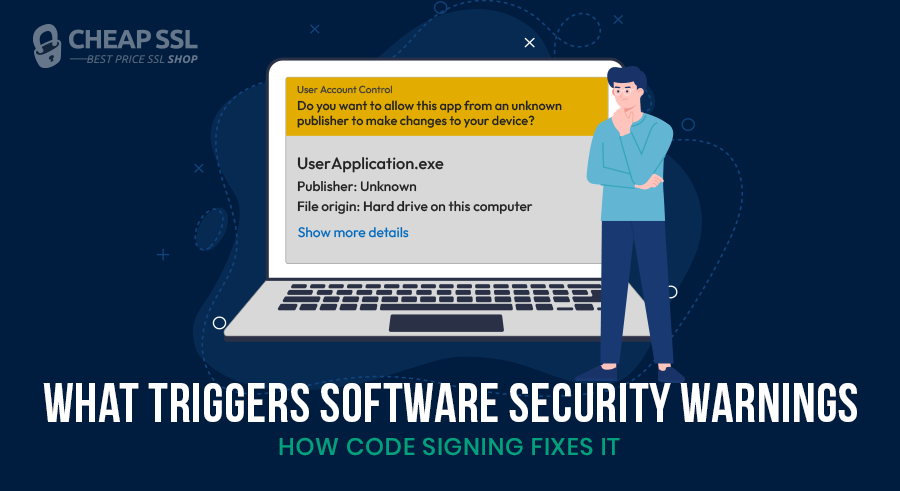
Unsigned software triggers security warnings because operating systems have no way to verify who built the file or whether it has been tampered with. Windows and macOS run a trust check on every executable before it is executed, and without a valid signature, that check fails by default.
But signing alone does not eliminate every warning. Software reputation plays a role too, and most developers only find out after release. This post covers how OS trust evaluation works, what code signing does, and what to get right before distributing software publicly.
What Happens When You Run Unsigned Software
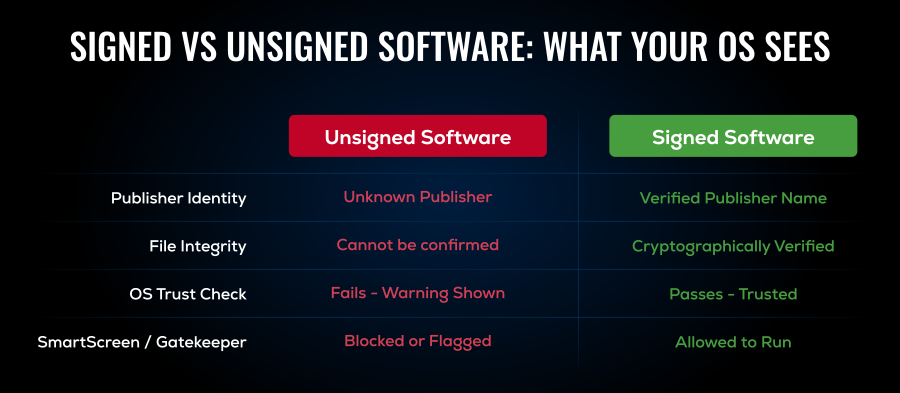
When a user launches downloaded software, the OS attempts to check the publisher and the code of the software. They verify publisher identity, file integrity, and reputation. Without digital signatures of the software, the operating system does not know who created the software and treats unsigned software as a potential threat.
Typical Warning Examples
The OS stops the execution and shows the user one of the following:
- The publisher warning: Windows UAC has the label of an unverified and untrusted publisher.
- Windows Defender SmartScreen alert: Prevents the execution of unidentified or unverified files with respect to the Microsoft database of cloud recognition.
- The macOS unknown developer warning: Apple’s Gatekeeper blocks apps by placing a cold stop when the developer signature is not recognized.
Why Operating Systems Show Security Warnings for Unsigned Software
Here are some of the key security reasons behind the warning signs.
Lack of Verified Publisher Identity
Without a digital signature, the OS cannot verify publisher or the integrity of the file. Attackers use that gap. Malware programs usually appear as legitimate programs and the operating system cannot distinguish between the two programs unless a verified identity is cryptographically attached to the executable. The unknown publisher warning is used as the last gateway which cautions the user about the danger before the software runs and damage their system.
Risk of Software Tampering
This is perhaps the most critical difference between signed and unsigned software: what happens to the code once it is shipped. Unsigned files can be modified without much attention being given to them by a bad actor who is intercepting the binary and changing it back to redistribute it. Signed software makes the code tamper evident by applying a cryptographic hash. Even a single bit of alteration will break the signature.
Protection Against Malware Distribution
Getting a code signing certificate requires a verified identity. You have to go through a Certificate Authority, prove who you are, and take on legal accountability for what you sign. That process is too expensive and too risky for most malware authors. Because of this, modern operating systems default to blocking unsigned executables. It is not a perfect filter, but it stops a significant portion of threats before the user is ever involved.
How Software Reputation Systems Work
A modern software reputation system does not judge a file based on a single signal.
It weighs several, like:
- Digital signature presence
- Publisher identity
- Download reputation
- Behavioral signals from prior executions
- Malware detection signals
The goal is straightforward: assess risk before the user clicks through it. But here’s the part that catches a lot of developers off guard. Even a clean, properly signed application can still trigger a warning if it has no reputation history yet.
The part many developers miss is; legitimacy does not guarantee trust on day one. Even a clean application may trigger warnings if it has no reputation history yet. If the file is new, rarely downloaded, or has not built enough trust signals, the OS may still treat it cautiously.
How Code Signing Certificates Establish Trust
A Code Signing Certificate is a digital credential issued by a trusted Certificate Authority that cryptographically links a software file to the publisher’s verified identity. When a developer signs an executable, the CA has already verified who they are. The signature itself binds the publisher identity to a hash of the file at the exact moment of signing.
In practical terms, a signed software file tells the user two things:
- who published it
- whether it has been modified after signing
Here’s what that process looks like in practice:
- The developer obtains a Code Signing Certificate from a trusted CA after identity verification.
- Before distribution, the developer signs the executable using their private key. This generates a cryptographic hash of the file and attaches it to the binary along with the certificate.
- When a user runs the file, the system compares the file’s current state with the original signed version.
- If anything in the file is changed after signing, the signature breaks immediately.
- The OS checks the certificate against its chain of trust back to a root CA it already trusts.
This process confirms verified published identity and temper protection, reducing security warnings. Self-signed certificates don’t do this — which is why they trigger the same kind of warnings as unsigned software.
Why Even Signed Software May Initially Show Warnings?
This is where software reputation creates confusion. Many developers assume signing a file is enough to eliminate every warning immediately; it is not. A valid signature helps, but reputation still matters. That is why a SmartScreen warning can appear even when the software is properly signed.
New Software Has No Reputation Yet
Signed software may still trigger warnings if it has just been released or has only a small download footprint. If few users have downloaded or run the application, the OS has limited evidence that the software is broadly trusted. Signing proves identity, but it does not automatically create a reputation.
Reputation Builds Over Time
Reputation improves as the application gains real-world usage. With more downloads, successful installs, and signals that the software is gaining traction, it starts to be accepted as legitimate software.
As history builds, trust builds with it. The operating system sees broader adoption, stronger prevalence, and fewer reasons to interrupt the user. Over time, the warnings usually fade because the application is no longer unknown.
Best Practices for Developers Distributing Software
Good code signing best practices are part of secure software distribution, not an optional extra.
- Always sign executables before distribution: If users download software from your site, app store, or update server, it should already be signed. That includes installers and any security-sensitive components that affect the launch experience.
- Use timestamping when signing software: The signature was applied when the certificate was still valid, and a timestamp is used to maintain the trust even after the expiration of the certificate.
- Monitor certificate expiration closely: An expired certificate can interrupt release workflows, create avoidable trust issues, and introduce unnecessary friction for users.
- Secure private keys with FIPS-compliant hardware tokens: Industry standards mandate that Code Signing Certificates must have their private keys generated and stored on secure hardware like hardware security modules (HSM) or tokens.
In the event an attacker obtains your signing key, they can use your identity to sign malicious code. At that point, the problem is not just technical but can lead to a reputational crisis.
How Code Signing Helps Developers Avoid Security Warnings
When software is signed correctly, the operating system can display the verified publisher name instead of a vague “Unknown Publisher” label. That one change has an immediate effect. Users are more likely to trust what they are installing when the software shows a real, verifiable identity.
It also improves download confidence. People hesitate when a security prompt feels anonymous. They move forward more easily when the trust signal is clear.
From a developer’s perspective, every warning introduces friction and every moment of uncertainty gives users a reason to close the installer, abandon the download, or question the legitimacy of the product. Code signing does not just protect the file. It helps protect adoption.
Secure Your Software Distribution with a Code Signing Certificate
Any software that is available online must be signed first before it gets to the users. Trusted Code Signing Certificate lets the operating system verify publisher identity, ensure file integrity, and minimize unwanted security warnings when installing the files.
Even legitimate applications may encounter credibility issues immediately after release due to a missing code signing certificate. If you’re looking to get your software signed, CheapSSLShop is an authorized reseller of certificates from Comodo, Sectigo, and DigiCert — the same certificates, at up to 80% off the direct CA price, with free technical support included.
Find the Right Certificate for Your Software
Extended Validation (EV)
- Comodo EV Code Signing Certificate
- Sectigo EV Code Signing Certificate
- DigiCert EV Code Signing Certificate
Organization Validation (OV)
FAQs
Why does Windows show an “Unknown Publisher” warning?
Is unsigned software unsafe?
Does code signing remove SmartScreen warnings?
Summary
Unsigned software fails the OS trust check by default — no verified publisher, no integrity proof and no path to trust. Code signing certificates resolve this by attaching a cryptographically verifiable identity to the executable, giving the OS the evidence it needs to make an informed trust decision.
Signing does not instantly eliminate every warning; your reputation still matters, and that takes time to build. But without a valid signature, that reputation can never be established. For any developer distributing software publicly, signing is the baseline.
Stop the “Unknown Publisher” warning before your users see it
Every unsigned installer is a trust problem waiting to happen. A CA-issued Code Signing Certificate lets Windows and macOS verify your identity, confirm your file hasn’t been altered, and show users a name they can trust.
Related Posts: